


Data & Comm
Data & Comm products support low-voltage voice, network, and media connections at walls, boxes, and equipment locations. Start by matching the connection type and cable category, then choose the correct wall plate, service box, or termination hardware for the installation. For locations combining power and data, use an assembly designed to keep the services properly separated. Confirm connector type, port count, mounting format, and compatibility with the installed cable or device before ordering.


Showing 21–40 of 160 results

Enerlites 2-Gang Flip Lids Fb Kit With 20A Twr Duplex / Datacom Npb 975549-S-D

Enerlites 2-Gang Pop-Up Fb Kit With 20A Twr Decorator Receptacle / Rj45 Npb 962301-S-D

Enerlites V&A Two Rj11 4-Pos / 4-Cond Light Almond 6503-LA
Enerlites Cat6 Female To Female Coupler White 6110-W

Enerlites 2-Gang Flip Lids Fb Kit With 20A Twr Duplex / Datacom Brass 975549-C-D

Enerlites Insert Decorator Datacom 6-Port Plate White 6266-W

Enerlites Insert Decorator Datacom 1-Port Plate White 6261-W

Enerlites Phone Jacks Light Almond 6106-LA

Enerlites Insert Decorator Datacom 2-Port Plate White 6262-W
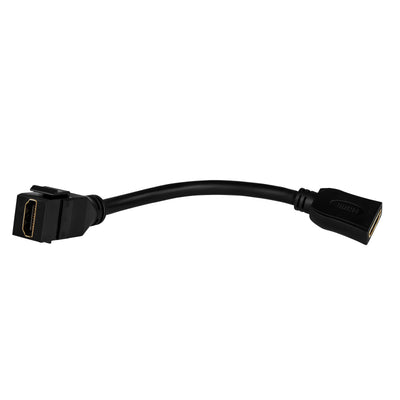
Enerlites Hdmi Female Keystone With Pigtail Black 6108-BK
Enerlites Cat6 Female To Female Coupler Bl 6110-BL

Enerlites V&A Rj11 4-Pos / 4-Cond Light Almond 6501-LA
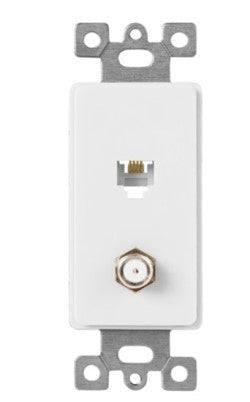
Enerlites V&A Rj11 4-Pos / 4-Cond & F-Type Conf To F Light Almond 6507-LA

Enerlites Insert Decorator Datacom 4-Port Plate White 6264-W

Enerlites Insert Decorator Datacom 3-Port Plate White 6263-W

Orbit White Decorative Wall Jack DWJFW

Orbit White Decorative Wall Jack DWJ64W

Dottie 1/4 in x 1/8 in UV Black Bell Telephone and Thermostat Wire Strap PLX18B (400-Pack)

Dottie 1/4 in x 1/8 in White Bell Telephone and Thermostat Wire Strap PLX18W (400-Pack)

Orbit Keystone Jack Fconnector White KJFW
About Data & Comm
How to Choose Data & Comm Products for Low-Voltage Connections
Data and communication hardware should be selected around the connection being terminated, not simply by the shape of the wall plate or opening. Start by identifying the service—Ethernet, telephone, coaxial, fiber, or another low-voltage signal—then match the connector, cable category, mounting format, and termination method. A clean installation also requires the correct box or support behind the finished opening, especially where communications cabling shares a floor, wall, or furniture location with electrical power.
- Finishing a wall outlet or communications opening: start with the correct wall plate configuration.
- Bringing power and data to a conference table or open floor: review multi-service floor boxes.
- Protecting terminations or equipment connections: compare appropriate boxes and enclosures.
- Routing and securing cable along the pathway: use suitable cable supports and ties.
- Adding line-voltage power beside a data location: select the required receptacle separately.
Match the Connector to the Service Before Choosing the Plate
A wall opening can look similar while serving very different systems. An RJ45 Ethernet connection, an RJ11 telephone connection, and a coaxial connector are not interchangeable simply because they can all fit into a one-gang communications plate. Identify the cable and equipment at both ends of the run before choosing the finished device.
For example, an office wall location may need one Ethernet data port and one voice connection while another room needs a coaxial media connection. The correct plate is the one that accepts the required modules and provides the right number of positions without leaving unsupported or mismatched openings.
Decision rule: specify the connector first and the wall plate second. A plate only provides the mounting interface; it does not determine the signal standard or network performance.
Cat5e, Cat6 and Cat6A Components Need to Be Planned as a Channel
Ethernet performance depends on the complete channel, including the installed cable, jacks or termination hardware, patching components, and connected equipment. Cat5e, Cat6, and Cat6A are different performance categories, so buying one higher-rated component does not automatically upgrade the entire link.
A Cat6A jack installed on an older lower-category cable, for example, cannot make the finished channel perform as Cat6A. The channel is constrained by its cabling design and the lowest-performing relevant component. New installations should therefore establish the intended network category before quantities of jacks, plugs, patching hardware, or cable are ordered.
Decision rule: keep the permanent cabling and termination components aligned to the specified category rather than mixing parts based only on connector appearance.
For a deeper comparison of the three common copper categories, see Lumera's Cat5e vs. Cat6 vs. Cat6A guide.
RJ45 Plug vs. Keystone Jack: Use the Right Termination for the Cable
An RJ45-style modular plug and a wall jack perform different jobs. A plug is crimped onto the end of a cable and is commonly used on patch cords and other direct equipment connections. Wall jacks and patch-panel terminations typically use insulation-displacement contacts, where the individual conductors are punched into color-coded terminals.
For a permanent cable run between a communications room and a wall outlet, terminating the solid horizontal cable on a jack at the work area and an appropriate panel or termination point at the other end usually creates a more serviceable installation than crimping plugs directly onto both ends.
Decision rule: use the termination method intended for the cable construction and installation type. Solid and stranded conductors, plugs, and punch-down terminations are not automatically interchangeable.
Lumera's RJ45 termination guide covers plug termination and the difference between crimping and punch-down connections in more detail.
Keep Power and Data Properly Separated
Power and communications services often need to reach the same workstation, conference table, floor opening, or wall location, but that does not mean the conductors should simply share an undivided space. The box and pathway need to be designed for the combination of services being installed and for the applicable separation requirements.
A conference room floor box is a good example. The location may need receptacles for laptops beside low-voltage connections for network or AV equipment. A multi-service box uses separate compartments or barriers so those services can be presented at one location without treating the line-voltage and communications wiring as one wiring system.
Decision rule: if power and low-voltage services occupy the same floor or wall location, choose a box or assembly specifically designed for multi-service installation instead of improvising inside a standard single-service box.
Wall Plates: Match Port Count, Opening Style and Box Format
The finished plate needs to coordinate with both the communications modules in front and the box or mounting hardware behind it. Count the actual ports required, allow for future blank positions only when the selected plate supports them properly, and confirm whether the installation uses a standard device box, low-voltage bracket, floor-box insert, or another mounting system.
A two-port office drop, for example, may use both positions immediately, while a conference room may need several different low-voltage connection types in one location. The number of gangs and the number of communications ports are not always the same thing, so do not order plates solely from the gang count.
If the project also includes standard switches or receptacles, Lumera's wall plate collection covers the broader device-plate side of the installation.
Cable Routing and Support Affect the Finished Installation
Good data terminations can still be undermined by poor cable routing. Communications cable should be supported so that its weight is not hanging from the connector, and bends or fastening methods should not crush or deform the cable. Avoid using an undersized tie or staple simply because it physically closes around the bundle.
For a run carrying several cables above a ceiling or along framing, plan the pathway before pulling cable. Support spacing, bend requirements, pathway fill, firestopping, and other installation details depend on the cable type and project conditions, so the selected supports need to suit the installation rather than merely hold the bundle in place.
Decision rule: use fastening hardware to support the run without damaging the cable jacket or changing the cable geometry. If the project needs general cable-securing hardware, review Lumera's cable ties and supports.
Telephone, Ethernet and Media Connections Should Stay Clearly Identified
Low-voltage wall devices can look similar after installation, especially when several connections share the same color and plate style. Clear identification reduces mistakes during commissioning and later service work. A telephone jack should not be mistaken for Ethernet, and an unused modular opening should not be assumed to support a particular network category without checking what is terminated behind it.
This matters even more in offices, multifamily properties, retail sites, and maintenance environments where technicians may work on the system years after the original installation. Record the destination of each run, keep labeling consistent at both ends, and avoid using identical unlabeled openings for different services.
Decision rule: if two ports perform different functions, make that difference clear in the labeling or documentation rather than relying on someone to recognize the connector later.
What to Confirm Before Ordering Data & Comm Hardware
Build the material list from the complete connection instead of ordering the visible parts first. Confirm these details for each location:
- Service type: Ethernet, telephone, coaxial, fiber, AV, or another low-voltage connection.
- Cable specification: category, shielding where applicable, and conductor type.
- Connector: the exact plug, jack, coupler, or adapter required.
- Termination method: crimp, punch-down, feed-through, or another specified method.
- Port count: number and arrangement of connections at the location.
- Mounting format: wall box, bracket, floor box, enclosure, rack, or other hardware.
- Power separation: required barriers or compartments where line voltage is nearby.
- Pathway: cable support, routing, and environmental conditions between endpoints.
For permanent network installations, test and document completed runs before they are placed into service. This makes wiring errors, damaged pairs, labeling mistakes, or incorrect terminations much easier to correct before ceilings and work areas are fully finished.
Data & Comm Products for Floor Boxes and Work Areas
Work-area connections often bring several systems to one location. In an office, the same workstation might need network connectivity and standard electrical power; a conference room may add AV or additional data ports. The floor or wall hardware should be selected around those services as a complete assembly rather than as unrelated covers and inserts.
Lumera's floor box options include configurations intended for single-service and multi-service installations. Match the box, internal separation, cover, finished-floor condition, and device mounting hardware to the actual project before ordering the communications inserts.
Ordering Data & Comm Hardware for a Project
For multi-room offices, tenant improvements, multifamily work, or repeated data drops, create a connection schedule before placing the order. Record the service type, port count, cable category, termination style, wall or floor mounting method, quantities, and any power/data combination locations.
For larger quantities, add the required products to Lumera's project quote request so the schedule and quantities can be reviewed together rather than ordering unrelated components one location at a time.
Data & Comm FAQs
What does Data & Comm mean in electrical supplies?
Data & Comm refers to low-voltage hardware used to route, terminate, mount, and access communication services such as network, telephone, media, and related signal connections. The category can include finished wall interfaces as well as boxes and supporting hardware. The correct product depends first on the service and connector being installed, not simply on the plate style.
What is the difference between an RJ45 plug and a keystone jack?
An RJ45-style plug terminates directly onto a cable and is commonly used on patch cords, while a keystone-style network jack creates a fixed outlet or panel connection. Permanent building cable is commonly punched down onto a jack rather than terminated as a loose patch cord. The cable category and conductor construction should match the selected termination hardware.
Can I use a Cat6 jack with Cat5e cable?
A higher-category jack does not raise the rating of lower-category cable. The finished channel is limited by the cabling system and its relevant components, so a Cat6 jack on a Cat5e run does not make that run Cat6. For new work, keep the cable and termination hardware aligned with the intended network category from the beginning.
Can power and data be installed in the same floor box?
They can share a purpose-built multi-service location when the box provides the required separation between line-voltage and low-voltage wiring and the complete installation meets applicable requirements. Do not place power and data conductors together inside an ordinary undivided box. Use a suitable multi-service floor box or approved partitioned assembly.
Should permanent Ethernet cable use plugs or wall jacks?
Permanent horizontal cabling is normally terminated on fixed jacks or patch-panel style connections, while patch cords use plugs at their ends. This keeps the permanent cable supported and makes moves or equipment changes easier. Lumera's RJ45 termination guide explains how plug and punch-down terminations differ.
How do I choose a data wall plate?
Start with the connector types and number of ports required, then match the plate or insert system to the box or mounting bracket behind the wall. Do not choose by gang count alone. A plate must physically accept the selected communication modules and provide the correct finished interface for the installation.