


Sensors & Controls
Lighting sensors and controls include occupancy and vacancy switches for rooms used intermittently, photocells for dusk-to-dawn exterior lighting, and timers for scheduled shutoff. Wireless remotes provide an extra control point, while compatible smart controllers support connected switching and scenes. Select by what should trigger the circuit, where the device will mount, and the equipment it must work with. For building-wide replacements, prepare device quantities and circuit details for a project quote.


Showing 1001–1020 of 1117 results

Intermatic 125 VAC 60 Hz Timer Motor WG730-14D
Intermatic MOTOR-BOXED,125V 60HZ WG720-10D
Intermatic WG1600-11 WG1600-11
Intermatic MOTOR-BOXED,125V 60HZ WG190-15D

Intermatic 125-277 VAC 15 Minute Max 50/60 Hz White Decorator Spring Wound Countdown Timer FD15MWC

Intermatic 125-277 VAC 15 Minute Max 50/60 Hz White Decorator Spring Wound Countdown Timer FD15MHW

Intermatic 125-277 VAC 15 Minute Max 50/60 Hz Ivory Decorator Spring Wound Countdown Timer FD15MC

Intermatic 125-277 VAC 15 Minute Max 50/60 Hz Light Almond Decorator Spring Wound Countdown Timer FD15MAC

Intermatic 480 V Electronic Photocontrol EK4235S

Intermatic 120-277 V Metal Electronic Photocontrol EK4436SM

Intermatic 208-277 V Thermal Photocontrol K4223C

Intermatic 125-277 VAC 60 Minute Max 50/60 Hz Silver Commercial Spring Wound Countdown Timer FF60MHC

Intermatic 125-277 VAC 60 Minute Max 50/60 Hz Silver Commercial Spring Wound Countdown Timer FF60MC

Intermatic 125-277 VAC 5 Minute Max 50/60 Hz Silver Commercial Spring Wound Countdown Timer FF5MH
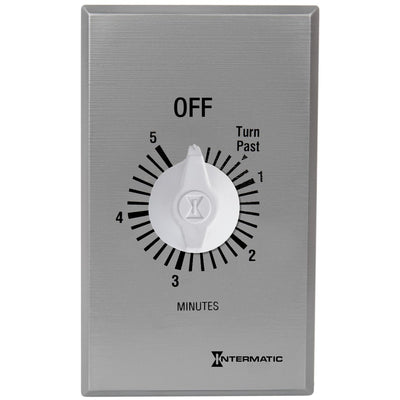
Intermatic 125-277 VAC 5 Minute Max 50/60 Hz Silver Commercial Spring Wound Countdown Timer FF5M

Intermatic 125-277 VAC 30 Minute Max 50/60 Hz Silver Commercial Spring Wound Countdown Timer FF30MH

Intermatic 125-277 VAC 30 Minute Max 50/60 Hz Silver Commercial Spring Wound Countdown Timer FF30MC

Intermatic 125-277 VAC 15 Minute Max 50/60 Hz Silver Commercial Spring Wound Countdown Timer FF15MH

Intermatic 125-277 VAC 15 Minute Max 50/60 Hz Silver Commercial Spring Wound Countdown Timer FF15MC

Intermatic 125-277 VAC 60 Minute Max 50/60 Hz White Decorator Spring Wound Countdown Timer FD60MWC
About Sensors & Controls
How to Choose Lighting Sensors and Controls: Trigger, Coverage, and Wiring
Lighting sensors and controls should be selected by the event that needs to change a circuit: presence, available daylight, a clock schedule, or a paired command. A contractor replacing wall switches across a school faces different questions from a facility manager automating exterior lighting. This guide helps you identify the right control family, check detection coverage, and spot electrical or ecosystem conflicts before ordering. Those decisions depend on the connected equipment and installation conditions, not the appearance of a product.
Quick Picker: Match the Control to the Job
- 12-by-14-foot meeting room: Start with occupancy and vacancy sensors for automatic shutoff.
- Exterior sign after sunset: Use dusk-to-dawn photocells when daylight is the trigger.
- Restroom fan running 20 minutes: Compare countdown and programmable timers.
- Finished hallway needing another control point: Consider wireless lighting remotes.
- Three-room connected scene: Review smart lighting controls and pairing requirements.
Occupancy vs. Vacancy Sensors: Decide How the Lights Turn On
Consider a 12-by-14-foot conference room with daylight entering through one wall. Occupancy mode can turn lighting on when movement is detected and off after a set delay; vacancy mode requires manual ON and handles automatic OFF. The right behavior follows the room's use and applicable energy code, not the shape of the sensor housing. Someone entering only to collect papers may not need the lights to turn on.
Decision rule: If manual-on operation is required or preferred, specify a vacancy-capable device and verify that its operating mode can be set accordingly. Record the ON behavior and off-delay for each room before choosing the switch.
PIR vs. Dual-Technology Sensor Coverage: Choose the Mounting Position
For a 30-foot L-shaped corridor with an 8-foot ceiling, a wall-switch PIR sensor may not see movement around the corner. Passive infrared sensing relies on a view of moving heat sources; ultrasonic and dual-technology devices can address some detection challenges, although their sensitivity and false-trigger behavior also depend on placement. A ceiling-mounted unit has a different viewing geometry from a wall switch.
If partitions interrupt the expected PIR detection zone, use an appropriately located ceiling sensor or a suitable alternative sensing method instead of relying on a headline square-foot rating. Review the manufacturer's coverage plot at the proposed mounting height, including minor-motion detection for seated occupants.
Photocells vs. Timers: Use Daylight or a Clock as the Trigger
Think of a 10-pole service yard where lights should turn on at dusk but go off before the morning shift. A photocell reacts to ambient light; a timer operates by schedule or countdown, and astronomic models calculate seasonal sunrise and sunset times. A photocell alone doesn't establish a fixed late-night shutdown, while an ordinary fixed-time schedule won't track dusk through the year.
If the lights must go off at 11 p.m., start with a programmed schedule and determine whether a separate daylight input is necessary. Have the electrician confirm the switching rating, sensor location away from the controlled light, and manual override before specifying the circuit.
Wireless Remotes vs. Smart Controls: Confirm What Receives the Command
A three-room office retrofit may need another wall control without opening finished partitions. A wireless remote sends commands to a compatible receiving dimmer, switch, or controller; the transmitter doesn't usually switch the electrical load on its own. App-based scenes and multi-room scheduling depend on the supported device family, pairing method, and sometimes a hub.
If the job needs only an added control point, a paired remote may be enough; if several zones must act together, establish a compatible smart system first. Larger projects may call for commercial lighting control systems with coordinated zoning. List receivers, remotes, and any required hub on the same equipment schedule.
Sensor and Control Specs: Check Voltage, LED Load, and Wiring
An eight-room retrofit may mix 120V wall switches with 277V corridor circuits. Check the load as carefully as the supply: LED drivers can have switching characteristics different from resistive equipment. Use the device specification and wiring diagram to confirm:
- Voltage: Match the control's input and the circuit supply.
- Load: Check LED, ballast, fan, or motor ratings.
- Wiring: Verify neutral and multi-location requirements.
- Output: Distinguish relay switching from 0-10V dimming.
- Settings: Confirm time delay, sensitivity, and override.
If brightness must vary instead of switching fully on or off, require a driver-compatible dimming arrangement rather than assuming the occupancy switch can dim. Document the voltage, load type, and control protocol before approving the schedule.
Replacing Wall Sensors: Check the Box, Plate, and Outdoor Rating
An existing two-gang switch box may have line and load conductors but no neutral for a powered control. Cover fit, box depth, and the device's wiring diagram can make a visually similar replacement unsuitable. Outdoor photocells add an exposure check: a protected location and a rain-struck mounting point don't necessarily require the same environmental rating.
If no neutral is available, select a listed no-neutral device suitable for the connected load or plan an approved wiring change before purchasing. Appropriate electrical device boxes and matching wall plates and switch plates may also be needed. Have a qualified electrician verify hardwired changes and the completed outdoor assembly.
Ordering Sensors and Controls for Multiple Rooms
For a 25-room renovation, group devices by trigger, operating mode, coverage, wiring, and quantity rather than finish alone. Lumera offers trade accounts for eligible businesses with access to volume and project quotes. Approved businesses may separately apply for Net payment terms. Keep devices needing hubs, receivers, or different voltages on separate schedule lines.
Request a Sensors and Controls Project Quote
For a multi-zone installation, request a project quote with the room and circuit schedule rather than a list of finish colors. Have these details ready:
- Room use, control trigger, and device quantities
- Mounting location and expected sensing coverage
- Supply voltage, connected load, and available wiring
- Wireless pairing, dimming, or outdoor-rating requirements
Flag rooms that require manual-on operation or control-system commissioning before the final selection.
Lighting Sensor and Control FAQs
What is the difference between an occupancy sensor and a vacancy sensor?
An occupancy sensor generally turns lights on when movement is detected and off after the room is vacant; a vacancy sensor requires manual turn-on but provides automatic shutoff. Some products support configurable modes, so the exact device setup and applicable local energy code determine the required behavior. Select the operating mode before comparing finish or detection range.
How is a photocell different from an astronomic timer?
A photocell switches according to measured ambient light; an astronomic timer uses calculated sunrise and sunset times based on its configured location. A photocell responds to actual local light, while the timer follows its programmed astronomical schedule. Lumera's electrical timer switch guide explains how timing modes affect the choice for exterior circuits.
Which is better for a partitioned room: PIR or dual-technology sensing?
Dual-technology sensing can be a better starting point when partitions or minor movements make PIR coverage unreliable. PIR relies on line of sight, while combined sensing methods can improve detection under appropriate conditions. Actual performance still depends on product logic, aiming, and room geometry. Check the coverage diagram and mounting-height limits before choosing a sensor for the space.
Can any motion sensor dim LED lights?
No. A switching sensor generally turns the connected load on and off, while dimming requires a compatible driver and control signal. For fixtures designed around 0-10V control, review suitable ELV and 0-10V dimmers, but confirm how occupancy control integrates with that system. A sensor marked LED-compatible is not necessarily a dimming sensor.
Can a dusk-to-dawn photocell provide indoor daylight harvesting?
Not by itself. A basic dusk-to-dawn photocell switches a load at a light threshold, while daylight harvesting adjusts electric light as daylight changes in the occupied area. Daylight harvesting requires compatible sensors, dimming equipment, and commissioning. Lumera's daylight harvesting guide explains how that control strategy differs from simple dusk-to-dawn switching.